Friday, July 30, 2010

0 comments

Cicero Blogger Template

Here's a new Blogger Template - Cicero Blogger Template with Ads Ready, Featured Posts, Page Navigation and More.


This Blogger Template is very professional blogger template that is converted from word press theme to blogger with great effort. It has all things you are looking for like Clean Read more posting, Search box, and RSS , Ad Banner, Featured Posts, Page Navigation and more..

Template Information:

Template Type : Blogger Template
Template Name : Cicero Blogger Template
License : Free Template + Creative Common License
Converter : BloggerTheme
WP Designer : Camelgraph
Features:

  • 2 columns layout

  • Left Sidebar

  • Featured Posts

  • 3 Columns Footer

  • Header Ad Banner (468 * 60 )

  • Sidebar Banners ( 125 * 125 )

  • RSS Widgets

  • Page Navigation

  • Gravatar on comments

  • Ready for Google Analytics, Adsense and Webmaster Tools

  • Read More Post

  • fixed width

  • Widget Ready

  • Blue background.

How to install this template:
  • First you have to install this template in your blogger account.

  • Go to your blogger layout and click on edit html tab.

  • Now just download your previous template and upload this new template to it.

How to edit Top navigation bar :
  • Just stay on html page and find these codes with ctrl + F.

  • Just search for

  • <div id='menu'>

  • Exchange your link with # and title with your title

How to edit Top ad banner:
  • Go to layout and click on edit html tab

  • Now search for these codes

  • <div class='ads468' style='padding-top:80px; text-align:right;'>

  • Change your sponsors banner with image link and url.

How to edit sidebar ad banner:
  • Go to layout and click on edit html tab

  • Now search for these codes

  • <div id='ads-wrap'>

  • Change your sponsors banner with image link and url.

How to change Logo:
  • Go to layout and click on edit html tab

  • Now search for these codes with ctrl + F.

  • <div id='header-wrap'>

  • Then Fing Logo URL and Change it.

How to Feedburner Subscription :
  • Go to layout and click on edit html tab

  • Now search for these codes with ctrl + F.

  • <div id='feeds'>

  • 1. Now look for these codes.

  • <form action='http://feedburner.google.com/fb/a/mailverify' id='feedform' method='post' onsubmit='window.open(&apos;http://feedburner.google.com/fb/a/mailverify?uri=Bloggerthemenet&apos;, &apos;popupwindow&apos;, &apos;scrollbars=yes,width=550,height=520&apos;);return true' target='popupwindow'>

  • Replace the Red Color Link with your Own Feedburner Subscription URL

  • 2. Now look for these codes.

  • <p><a href='http://feeds.feedburner.com/Bloggerthemenet'><img alt='' height='26' src='http://feeds2.feedburner.com/~fc/Bloggerthemenet?bg=990000&amp;fg=000000&amp;anim=1&amp;label=listeners' style='border:0' width='88'/></a></p>

  • Replace Green Color link with your own Feedburner URL

  • Replace Blue color Link with your own Feedburner Counter Image


How to edit Featured slider :
  • First go to layout and click on edit html

  • Now search for

  • <div id='gallery'>

  • Now look for these codes

  • <!-- FIRST SLIDE START -->

    <div>
    <img height='298' src='https://blogger.googleusercontent.com/img/b/R29vZ2xl/AVvXsEhpXEIj5zbOy5Dz-Mhi9a323jB2Dh4bSmpdQGaiK3zuvIOylxlSK1CzdYPPLEwJi66BWdP9rw2HK4KO2QwWznegQSJ9ouOZuWxyjrtbAF0KNTzv7M-yskzVsMTvEXtko8VxUYGgPUhrvo4Z/s1600/slide1.jpg' width='490'/>
    <div class='excerpt'>
    <p><a href='#YOUR LINKS TO THE POSTS HERE'>This is First Slide Title</a></p>
    <p class='excerpt-text'>Description of first Slide goes here.Vestibulum ante ipsum primis in faucibus orci luctus et ultrices posuere cubilia Curae...</p>
    </div>
    <a href='#YOUR LINKS TO THE POSTS HERE'><span class='feat-overlay'/></a>
    </div>

    <!-- FIRST SLIDE END -->

  • Replace Red Color Link with your post link

  • Replace Blue color with your Post Title and Post Description

  • Replace Green Color Link with your Direct Link of Image.


If you want to improve it further, and make it more search engine friendly, then see these Blogger tips and tricks

=> Download More Templates from Here <=

Metamorph Florist Blogger Template

Here's a new Blogger Template - Metamorph Florist Blogger Template.

Blogger theme


Features:
  • 2 columns layout

  • Right Sidebar

  • Soacial Bookmarking Ready Widgets

  • Fixed width

  • Green Color, Green Background.

Source and Designer : Templatesblock.

Template Instructions: Metamorph Florist Instructions Page

If you want to improve it further, and make it more search engine friendly, then see these Blogger tips and tricks

=> Download More Templates from Here <=

Thursday, July 29, 2010

0 comments

Kashva Blogger Template

Here's a new Blogger Template - Kashva Blogger Template with Ads Ready, Featured Posts and More.


This Blogger Template is very professional blogger template that is converted from word press theme to blogger with great effort. It has all things you are looking for like Clean Read more posting, Search box, and RSS , Ad Banner, Featured Posts and more..

Template Information:

Template Type : Blogger Template
Template Name : Kashva Blogger Template
License : Free Template + Creative Common License
Converter : BloggerTheme
WP Designer : Camelgraph
Features:

  • 2 columns layout

  • Left Sidebar

  • Featured Posts

  • 3 Columns Footer

  • Header Ad Banner (468 * 60 )

  • Sidebar Banners ( 125 * 125 )

  • RSS Widgets

  • Gravatar on comments

  • Ready for Google Analytics, Adsense and Webmaster Tools

  • Read More Post

  • fixed width

  • Widget Ready

  • Orange background.

How to install this template:
  • First you have to install this template in your blogger account.

  • Go to your blogger layout and click on edit html tab.

  • Now just download your previous template and upload this new template to it.

How to edit Top navigation bar :
  • Just stay on html page and find these codes with ctrl + F.

  • Just search for

  • <div id='menu'>

  • Exchange your link with # and title with your title

How to edit Top ad banner:
  • Go to layout and click on edit html tab

  • Now search for these codes

  • <div class='ads468' style='padding-top:40px; text-align:right;'>

  • Change your sponsors banner with image link and url.

How to edit sidebar ad banner:
  • Go to layout and click on edit html tab

  • Now search for these codes

  • <div id='ads-wrap'>

  • Change your sponsors banner with image link and url.

How to change Logo:
  • Go to layout and click on edit html tab

  • Now search for these codes with ctrl + F.

  • <div id='header-wrap'>

  • Then Fing Logo URL and Change it.

How to Feedburner Subscription :
  • Go to layout and click on edit html tab

  • Now search for these codes with ctrl + F.

  • <div id='feeds'>

  • 1. Now look for these codes.

  • <form action='http://feedburner.google.com/fb/a/mailverify' id='feedform' method='post' onsubmit='window.open(&apos;http://feedburner.google.com/fb/a/mailverify?uri=Bloggerthemenet&apos;, &apos;popupwindow&apos;, &apos;scrollbars=yes,width=550,height=520&apos;);return true' target='popupwindow'>

  • Replace the Red Color Link with your Own Feedburner Subscription URL

  • 2. Now look for these codes.

  • <p><a href='http://feeds.feedburner.com/Bloggerthemenet'><img alt='' height='26' src='http://feeds2.feedburner.com/~fc/Bloggerthemenet?bg=990000&amp;fg=000000&amp;anim=1&amp;label=listeners' style='border:0' width='88'/></a></p>

  • Replace Green Color link with your own Feedburner URL

  • Replace Blue color Link with your own Feedburner Counter Image


How to edit Featured slider :
  • First go to layout and click on edit html

  • Now search for

  • <div id='gallery'>

  • Now look for these codes

  • <!-- FIRST SLIDE START -->

    <div>
    <img height='298' src='https://blogger.googleusercontent.com/img/b/R29vZ2xl/AVvXsEhpXEIj5zbOy5Dz-Mhi9a323jB2Dh4bSmpdQGaiK3zuvIOylxlSK1CzdYPPLEwJi66BWdP9rw2HK4KO2QwWznegQSJ9ouOZuWxyjrtbAF0KNTzv7M-yskzVsMTvEXtko8VxUYGgPUhrvo4Z/s1600/slide1.jpg' width='490'/>
    <div class='excerpt'>
    <p><a href='#YOUR LINKS TO THE POSTS HERE'>This is First Slide Title</a></p>
    <p class='excerpt-text'>Description of first Slide goes here.Vestibulum ante ipsum primis in faucibus orci luctus et ultrices posuere cubilia Curae...</p>
    </div>
    <a href='#YOUR LINKS TO THE POSTS HERE'><span class='feat-overlay'/></a>
    </div>

    <!-- FIRST SLIDE END -->

  • Replace Red Color Link with your post link

  • Replace Blue color with your Post Title and Post Description

  • Replace Green Color Link with your Direct Link of Image.


If you want to improve it further, and make it more search engine friendly, then see these Blogger tips and tricks

=> Download More Templates from Here <=

Jasmin Blogger Template

Here's a new Blogger Template - Jasmin Blogger Template with Ads Ready, Featured Posts and More.


This Blogger Template is very professional blogger template that is converted from word press theme to blogger with great effort. It has all things you are looking for like Clean Read more posting, Search box, and RSS , Ready Social Widgets, Twitter Widgets,Ad Banner, Featured Posts and more..

Template Information:

Template Type : Blogger Template
Template Name : Jasmin Blogger Template
License : Free Template + Creative Common License
Converter : BloggerTheme
WP Designer : NewWpThemes
Features:

  • 3 columns layout

  • Right Sidebar

  • Featured Posts

  • Ads Ready

  • Two Navigation Bar

  • Search Box Ready

  • RSS, Twitter Widgets

  • Gravatar on comments

  • Ready for Google Analytics, Adsense and Webmaster Tools

  • Read More Post

  • fixed width

  • Widget Ready

  • White background.

How to install this template:
  • First you have to install this template in your blogger account.

  • Go to your blogger layout and click on edit html tab.

  • Now just download your previous template and upload this new template to it.

How to edit navigation bar No 1:
  • Just stay on html page and find these codes with ctrl + F.

  • Just search for

  • <div id='pagemenucontainer'>

  • Exchange your link with # and title with your title

How to edit navigation bar No 2:
  • Just stay on html page and find these codes with ctrl + F.

  • Just search for

  • <div class='navcontainer'>

  • Exchange your link with # and title with your title

How to edit Top ad banner:
  • Go to layout and click on edit html tab

  • Now search for these codes

  • <div style='padding: 10px 0 0 0; text-align:center;'>

  • Change your sponsors banner with image link and url.

How to edit sidebar ad banner:
  • Go to layout and click on edit html tab

  • Now search for these codes

  • <div class='sidebaradbox'>

  • Change your sponsors banner with image link and url.

How to edit Featured slider :
  • First go to layout and click on edit html

  • Now search for

  • <div id='s3slider'>

  • Now look for these codes

  • <li class='s3sliderImage' style='display: list-item;'>
    <a href='#YOUR LINKS TO THE POSTS HERE'><img alt='Imagen 1' src='https://blogger.googleusercontent.com/img/b/R29vZ2xl/AVvXsEi-iflEn0rsVzsWoA8cTF7kMBjJQxmRr9tilPB0V5G-PL4be8qHzj2lqgaOwxHgppalA1moT_3u4dn7dt5wLtMT-KrqvNusPu_Nq-VaTEV-GlDbf-jjQDVseGTwNuFIQdPNiorbBFrjFiog/s1600/1.jpg'/></a>
    <span style='display: block;'>
    <a class='featured-title block' href='#YOUR LINKS TO THE POSTS HERE' rel='bookmark' title='YOUR POST TITLE'>YOUR POST TITLE HERE</a><br/>
    SOME DESCRIPTION OF YOUR POST HERE
    </span>

    </li>

  • Replace Red Color Link with your post link

  • Replace Blue color with your Post Title and Post Description

  • Replace Green Color Link with your Direct Link of Image.

How to edit Twitter Social widget:
  • Go to layout and click on edit html tab

  • Now search for these codes with ctrl + F.

  • http://twitter.com/your user name

  • Replace your user name with your twitter account username.


If you want to improve it further, and make it more search engine friendly, then see these Blogger tips and tricks

=> Download More Templates from Here <=

Fractality Blogger Template

Here's a new Blogger Template - Fractality Blogger Template.

Blogger theme


Features:
  • 2 columns layout

  • Left Sidebar

  • Search Box Ready

  • RSS Ready Widgets

  • Fixed width

  • Glossy Look, Cool Header

  • Gray Background.

Source and Designer : Templatesblock.

Template Instructions: Fractality Instructions Page

If you want to improve it further, and make it more search engine friendly, then see these Blogger tips and tricks

=> Download More Templates from Here <=

Wednesday, July 28, 2010

0 comments

Garden Blogger Template

Here's a new Blogger Template - Garden Blogger Template for Personal Blogs.


Features:
  • 1 columns layout

  • No Sidebar

  • This Template for Personal Blog

  • Minisite Blogger Template

  • Stylish Navigation Menu

  • Fixed width

  • Green color.


Source and Designer : BloggerTheme and Templatemo

If you want to improve it further, and make it more search engine friendly, then see these Blogger tips and tricks

=> Download More Templates from Here <=

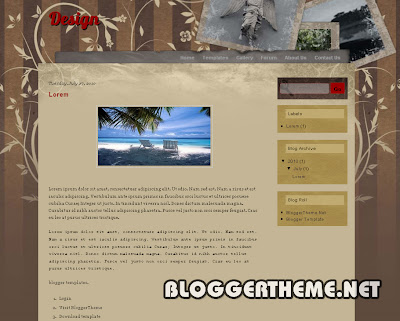
Design Blogger Template

Here's a new Blogger Template - Design Blogger Template.

Blogger theme


Features:
  • 2 columns layout

  • Right Sidebar

  • Search Box Ready

  • Fixed width

  • Brown Background.

Source and Designer : Templatesblock.

Template Instructions: Design Instructions Page

If you want to improve it further, and make it more search engine friendly, then see these Blogger tips and tricks
=> Download More Templates from Here <=

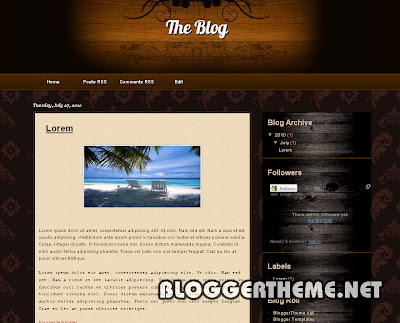
The Blog Blogger Template

Here's a new Blogger Template - The Blog Blogger Template.

Blogger theme


Features:
  • 2 columns layout

  • Right Sidebar

  • Top Navigation Bar

  • Fixed width

  • Dark Brown Background.

Source and Designer : Templatesblock.

Template Instructions: The Blog Instructions Page

If you want to improve it further, and make it more search engine friendly, then see these Blogger tips and tricks
=> Download More Templates from Here <=

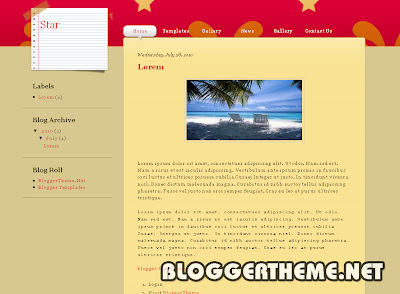
Star Blogger Template

Here's a new Blogger Template - Star Blogger Template.

Blogger theme


Features:
  • 2 columns layout

  • Left Sidebar

  • Top Navigation Bar

  • Fixed width

  • Brown Background.

Source and Designer : Templatesblock.

Template Instructions: Star Instructions Page

If you want to improve it further, and make it more search engine friendly, then see these Blogger tips and tricks
=> Download More Templates from Here <=

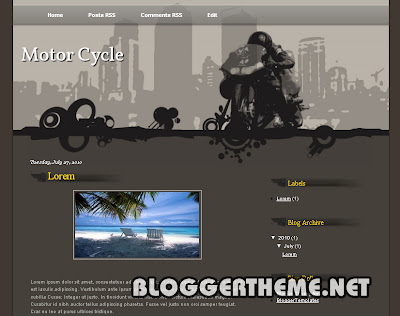
Motor Cycle Blogger Template

Here's a new Blogger Template - Motor Cycle Blogger Template.

Blogger theme


Features:
  • 2 columns layout

  • Right Sidebar

  • Top Navigation Bar

  • Fixed width

  • Brown Background.

Source and Designer : Templatesblock.

Template Instructions: Motor Cycle Instructions Page

If you want to improve it further, and make it more search engine friendly, then see these Blogger tips and tricks
=> Download More Templates from Here <=

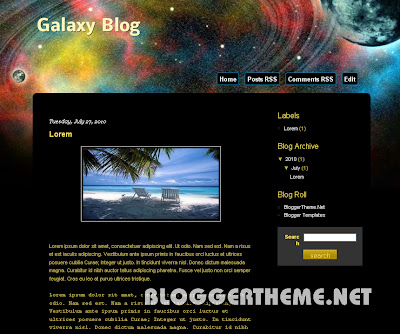
Galaxy Blog Blogger Template

Here's a new Blogger Template - Galaxy Blog Blogger Template.

Blogger theme


Features:
  • 3 columns layout

  • Right Sidebar

  • Search Box Ready

  • Fixed width

  • Black Background.

Source and Designer : Templatesblock.

Template Instructions: Galaxy Blog Instructions Page

If you want to improve it further, and make it more search engine friendly, then see these Blogger tips and tricks
=> Download More Templates from Here <=

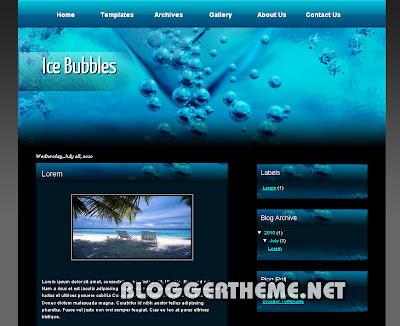
Ice Bubble Blogger Template

Here's a new Blogger Template - Ice Bubble Blogger Template.

Blogger theme


Features:
  • 2 columns layout

  • Right Sidebar

  • Top Navigation Bar

  • Social Bookmarking Widgets

  • Fixed width

  • Brown Background.

Source and Designer : Templatesblock.

Template Instructions: Ice Bubble Instructions Page

If you want to improve it further, and make it more search engine friendly, then see these Blogger tips and tricks
=> Download More Templates from Here <=

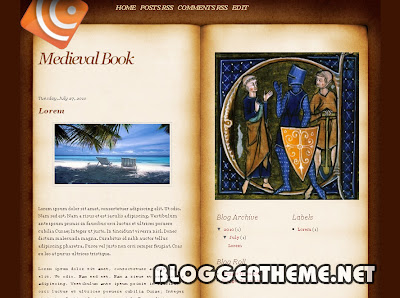
Medieval Book Blogger Template

Here's a new Blogger Template - Medieval Book Blogger Template.

Blogger theme


Features:
  • 3 columns layout

  • Right Sidebar

  • Top Navigation Bar

  • Fixed width

  • Brown Background.

Source and Designer : Templatesblock.

Template Instructions: Medieval Book Instructions Page

If you want to improve it further, and make it more search engine friendly, then see these Blogger tips and tricks
=> Download More Templates from Here <=

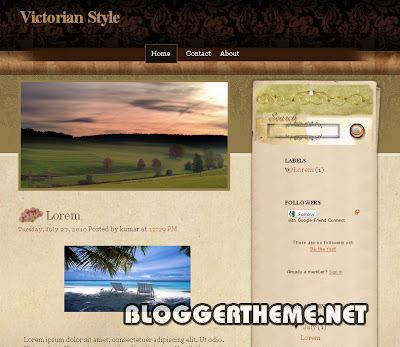
Victorian Style Blogger Template

Here's a new Blogger Template - Victorian Style Blogger Template.

Blogger theme


Features:
  • 2 columns layout

  • Right Sidebar

  • Search Box ready

  • Social Bookmark Widgets

  • Fixed width

  • Brown Background.

Source and Designer : SplashyTemplates.

If you want to improve it further, and make it more search engine friendly, then see these Blogger tips and tricks
=> Download More Templates from Here <=

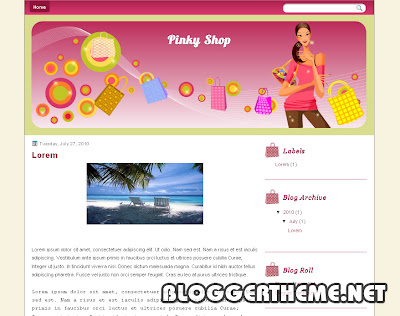
Pinky Shop Blogger Template

Here's a new Blogger Template - Pinky Shop Blogger Template.

Blogger theme


Features:
  • 2 columns layout

  • Right Sidebar

  • Search Box ready

  • Top Navigation Bar

  • Fixed width

  • Pink Color, White Background.

Source and Designer : DeluxeTemplates.

If you want to improve it further, and make it more search engine friendly, then see these Blogger tips and tricks
=> Download More Templates from Here <=

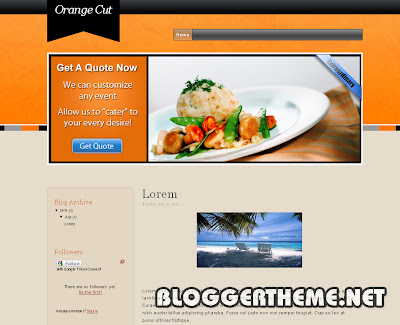
Orange Cut Blogger Template

Here's a new Blogger Template - Orange Cut Blogger Template.

Blogger theme


Features:
  • 2 columns layout

  • Left Sidebar

  • 3 Columns Footer

  • Fixed width

  • Brown Background.

Source and Designer : SplashyTemplates.

If you want to improve it further, and make it more search engine friendly, then see these Blogger tips and tricks
=> Download More Templates from Here <=

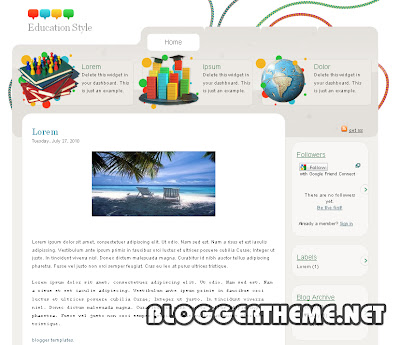
Education Style Blogger Template

Here's a new Blogger Template - Education Style Blogger Template.

Blogger theme


Features:
  • 2 columns layout

  • Right Sidebar

  • 3 Columns Footer

  • Fixed width

  • White Background.

Source and Designer : SplashyTemplates.

If you want to improve it further, and make it more search engine friendly, then see these Blogger tips and tricks
=> Download More Templates from Here <=

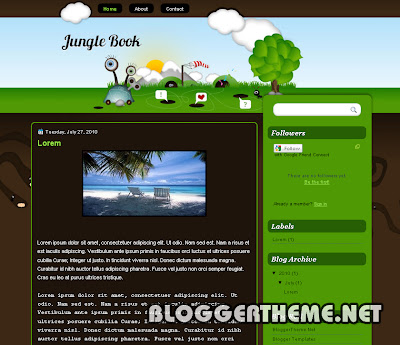
Jungle Book Blogger Template

Here's a new Blogger Template - Jungle Book Blogger Template.

Blogger theme


Features:
  • 2 columns layout

  • Right Sidebar

  • Search Box ready

  • Top Navigation Bar

  • Fixed width

  • Green Color, Dark Brown Background.

Source and Designer : DeluxeTemplates.

If you want to improve it further, and make it more search engine friendly, then see these Blogger tips and tricks
=> Download More Templates from Here <=

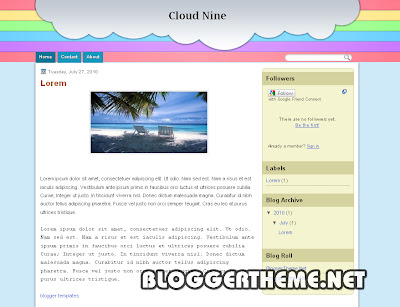
Cloud Nine Blogger Template

Here's a new Blogger Template - Cloud Nine Blogger Template.

Blogger theme


Features:
  • 2 columns layout

  • Right Sidebar

  • Search Box ready

  • Fixed width

  • Blue Background.

Source and Designer : DeluxeTemplates.

If you want to improve it further, and make it more search engine friendly, then see these Blogger tips and tricks
=> Download More Templates from Here <=

Tuesday, July 27, 2010

0 comments

Zig Zag Blogger Template

Here's a new Blogger Template - Zig Zag Blogger Template with Ads Ready, Featured Posts and More.


This Blogger Template is very professional blogger template that is converted from word press theme to blogger with great effort. It has all things you are looking for like Clean Read more posting, Search box, and RSS , Ready Social Widgets, Twitter Widgets,Ad Banner, Featured Posts and more..

Template Information:

Template Type : Blogger Template
Template Name : Zig Zag Blogger Template
License : Free Template + Creative Common License
Converter : BloggerTheme
WP Designer : NewWpThemes
Features:

  • 3 columns layout

  • Right Sidebar

  • Featured Posts

  • Ads Ready

  • Two Navigation Bar

  • Search Box Ready

  • RSS, Twitter Widgets

  • Gravatar on comments

  • Ready for Google Analytics, Adsense and Webmaster Tools

  • Read More Post

  • fixed width

  • Widget Ready

  • Black background.

How to install this template:
  • First you have to install this template in your blogger account.

  • Go to your blogger layout and click on edit html tab.

  • Now just download your previous template and upload this new template to it.

How to edit navigation bar No 1:
  • Just stay on html page and find these codes with ctrl + F.

  • Just search for

  • <div id='pagemenucontainer'>

  • Exchange your link with # and title with your title

How to edit navigation bar No 2:
  • Just stay on html page and find these codes with ctrl + F.

  • Just search for

  • <div class='navcontainer'>

  • Exchange your link with # and title with your title

How to edit Top ad banner:
  • Go to layout and click on edit html tab

  • Now search for these codes

  • <div style='padding: 25px 0 0 0; text-align:center;'>

  • Change your sponsors banner with image link and url.

How to edit sidebar ad banner:
  • Go to layout and click on edit html tab

  • Now search for these codes

  • <div class='sidebaradbox'>

  • Change your sponsors banner with image link and url.

How to edit Featured slider :
  • First go to layout and click on edit html

  • Now search for

  • <div id='s3slider'>

  • Now look for these codes

  • <li class='s3sliderImage' style='display: list-item;'>
    <a href='#YOUR LINKS TO THE POSTS HERE'><img alt='Imagen 1' src='https://blogger.googleusercontent.com/img/b/R29vZ2xl/AVvXsEi-iflEn0rsVzsWoA8cTF7kMBjJQxmRr9tilPB0V5G-PL4be8qHzj2lqgaOwxHgppalA1moT_3u4dn7dt5wLtMT-KrqvNusPu_Nq-VaTEV-GlDbf-jjQDVseGTwNuFIQdPNiorbBFrjFiog/s1600/1.jpg'/></a>
    <span style='display: block;'>
    <a class='featured-title block' href='#YOUR LINKS TO THE POSTS HERE' rel='bookmark' title='YOUR POST TITLE'>YOUR POST TITLE HERE</a><br/>
    SOME DESCRIPTION OF YOUR POST HERE
    </span>

    </li>

  • Replace Red Color Link with your post link

  • Replace Blue color with your Post Title and Post Description

  • Replace Green Color Link with your Direct Link of Image.

How to edit Twitter Social widget:
  • Go to layout and click on edit html tab

  • Now search for these codes with ctrl + F.

  • http://twitter.com/your user name

  • Replace your user name with your twitter account username.


If you want to improve it further, and make it more search engine friendly, then see these Blogger tips and tricks

=> Download More Templates from Here <=

Fashion Blog Blogger Template

Here's a new Blogger Template - Fashion Blog Blogger Template.

Blogger theme


Features:
  • 2 columns layout

  • Right Sidebar

  • Featured Posts

  • Search Box ready

  • Fixed width

  • Brown Color, Gray Background.

Source and Designer : Templatesblock.

Template Instructions: Fashion Blog Instructions Page

If you want to improve it further, and make it more search engine friendly, then see these Blogger tips and tricks

=> Download More Templates from Here <=

Caffiene Blogger Template

Here's a new Blogger Template - Caffiene Blogger Template.

Blogger theme


Features:
  • 3 columns layout

  • Right Sidebar

  • Featured Posts

  • Search Box ready

  • Fixed width

  • Brown Color, Red Background.

Source and Designer : Templatesblock.

Template Instructions: Caffiene Instructions Page

If you want to improve it further, and make it more search engine friendly, then see these Blogger tips and tricks

=> Download More Templates from Here <=

Sunday, July 25, 2010

0 comments

Dore Zot Blogger Template

Here's a new Blogger Template - Dore Zot Blogger Template.

Blogger theme


Features:
  • 3 columns layout

  • Right Sidebar

  • Ads Ready

  • Search Box ready

  • Social Bookmarking Widget

  • Fixed width

  • Gray Background.

Source and Designer : MyBloggerThemes.

If you want to improve it further, and make it more search engine friendly, then see these Blogger tips and tricks

=> Download More Templates from Here <=

Doodle Blogger Template

Here's a new Blogger Template - Doodle Blogger Template.

Blogger theme


Features:
  • 2 columns layout

  • Right Sidebar

  • Search Box ready

  • Social Bookmarking Widget

  • Nice Header

  • Fixed width

  • Brown Color.

Source and Designer : EZwpthemes.

If you want to improve it further, and make it more search engine friendly, then see these Blogger tips and tricks

=> Download More Templates from Here <=

Sticker Theme Blogger Template

Here's a new Blogger Template - Sticker Theme Blogger Template.

Blogger theme


Features:
  • 2 columns layout

  • Left Sidebar

  • Search Box ready

  • Social Bookmarking Widget

  • Fixed width

  • Brown Background.

Source and Designer : EZwpthemes.

If you want to improve it further, and make it more search engine friendly, then see these Blogger tips and tricks

=> Download More Templates from Here <=

Anime Heaven Blogger Template

Here's a new Blogger Template - Anime Heaven Blogger Template.

Blogger theme


Features:
  • 3 columns layout

  • Left and Right Sidebar

  • Search Box ready

  • Fixed width

  • Nice Header

  • Blue Color, Blue Background.

Source and Designer : Game4Fan.

If you want to improve it further, and make it more search engine friendly, then see these Blogger tips and tricks

=> Download More Templates from Here <=

Air Travel Blogger Template

Here's a new Blogger Template - Air Travel Blogger Template.

Blogger theme


Features:
  • 2 columns layout

  • Left Sidebar

  • Search Box ready

  • Social Bookmarking Widget

  • Fixed width

  • Brown Background.

Source and Designer : EZwpthemes.

If you want to improve it further, and make it more search engine friendly, then see these Blogger tips and tricks

=> Download More Templates from Here <=

Underground 2 Blogger Template

Here's a new Blogger Template - Underground 2 Blogger Template.

Blogger theme


Features:
  • 2 columns layout

  • Right Sidebar

  • Top Navigation Bar

  • Fixed width

  • Dark Background.

Source and Designer : TemplatesBlock.

If you want to improve it further, and make it more search engine friendly, then see these Blogger tips and tricks

=> Download More Templates from Here <=

South East Asia View Blogger Template

Here's a new Blogger Template - South East Asia View Blogger Template.

Blogger theme


Features:
  • 2 columns layout

  • Right Sidebar

  • Search Box ready

  • Ads ready

  • Top Navigation Bar

  • Fixed width

  • Red Color.

Source and Designer : EZwpthemes.

If you want to improve it further, and make it more search engine friendly, then see these Blogger tips and tricks

=> Download More Templates from Here <=

Love is Sharing Blogger Template

Here's a new Blogger Template - Love is Sharing Blogger Template.

Blogger theme


Features:
  • 2 columns layout

  • Left Sidebar

  • Search Box ready

  • Social Bookmarking Widget

  • Nice Header

  • Fixed width

  • Pink color, Pink Background.

Source and Designer : Ezwpthemes.

If you want to improve it further, and make it more search engine friendly, then see these Blogger tips and tricks

=> Download More Templates from Here <=

Anime Show Blogger Template

Here's a new Blogger Template - Anime Show Blogger Template.

Blogger theme


Features:
  • 3 columns layout

  • Right Sidebar

  • Search Box ready

  • Top Navigation Bar

  • Fixed width

  • Black Background.

Source and Designer : Deluxetemplates.

If you want to improve it further, and make it more search engine friendly, then see these Blogger tips and tricks

=> Download More Templates from Here <=

Saturday, July 24, 2010

0 comments

World Traveler Blogger Template

Here's a new Blogger Template - World Traveler Blogger Template.

Blogger theme


Features:
  • 2 columns layout

  • Right Sidebar

  • Search Box ready

  • Top Navigation Bar

  • Fixed width

  • Grey Background.

Source and Designer : DeluxeTemplates.

If you want to improve it further, and make it more search engine friendly, then see these Blogger tips and tricks

=> Download More Templates from Here <=

Shopping Girl Blogger Template

Here's a new Blogger Template - Shopping Girl Blogger Template.

Blogger theme


Features:
  • 3 columns layout

  • Right Sidebar

  • Search Box ready

  • Top Navigation Bar

  • Fixed width

  • Pink Background.

Source and Designer : Deluxetemplates.

If you want to improve it further, and make it more search engine friendly, then see these Blogger tips and tricks

=> Download More Templates from Here <=

Nicol Blogger Template

Here's a new Blogger Template - Nicol Blogger Template with Ads Ready, Read more and More.


This Blogger Template is very professional blogger template that is converted from word press theme to blogger with great effort. It has all things you are looking for like Clean Read more posting, Search box, and RSS ,Twitter Widgets,Ad Banner and more..

Template Information:

Template Type : Blogger Template
Template Name : Novel Blogger Template
License : Free Template + Creative Common License
Converter : BloggerTheme
WP Designer : NewWpThemes
Features:

  • 3 columns layout

  • Left and Right Sidebar

  • Header Banner (468 * 60 )

  • Sidebar Banners ( 125 * 125 )

  • RSS, Twitter Widgets

  • Gravatar on comments

  • Ready for Google Analytics, Adsense and Webmaster Tools

  • Read More Post

  • Two Navigation Menu

  • Top Navigation Menu

  • Search Box Ready

  • fixed width

  • Widget Ready

  • Grey color, White background.

How to install this template:
  • First you have to install this template in your blogger account.

  • Go to your blogger layout and click on edit html tab.

  • Now just download your previous template and upload this new template to it.

How to edit navigation bar No 1:
  • Just stay on html page and find these codes with ctrl + F.

  • Just search for

  • <div id='pagemenucontainer'>

  • Exchange your link with # and title with your title

How to edit navigation bar No 2:
  • Just stay on html page and find these codes with ctrl + F.

  • Just search for

  • <div class='navcontainer'>

  • Exchange your link with # and title with your title

How to edit Top ad banner:
  • Go to layout and click on edit html tab

  • Now search for these codes

  • <div class='span-13 last' style='padding-top: 15px; text-align:right;'>

  • Change your sponsors banner with image link and url.

How to edit sidebar ad banner:
  • Go to layout and click on edit html tab

  • Now search for these codes

  • <div class='sidebaradbox'>

  • Change your sponsors banner with image link and url.

How to edit Twitter Social widget:
  • Go to layout and click on edit html tab

  • Now search for these codes with ctrl + F.

  • http://twitter.com/Twitter User Name

  • Replace Twitter User Name with your twitter account username.


If you want to improve it further, and make it more search engine friendly, then see these Blogger tips and tricks

=> Download More Templates from Here <=

Extreme Blogger Template

Here's a new Blogger Template - Extreme Blogger Template.


This Blogger Template is very professional blogger template that is converted from CSS theme to blogger with great effort.

Template Information:

Template Type : Blogger Template
Template Name : Extreme Blogger Template
License : Free Template + Creative Common License
Converter : BloggerTheme
CSS Designer : Templatemo
Features:

  • 1 columns layout

  • No Sidebar

  • Top Navigation Menu

  • 3 Columns Footer

  • Featured Posts Slider

  • Read More Hack Ready

  • fixed width

  • Widget Ready

  • Brown Color.

How to install this template:
  • First you have to install this template in your blogger account.

  • Go to your blogger layout and click on edit html tab.

  • Now just download your previous template and upload this new template to it.

How to edit navigation bar:
  • Just stay on html page and find these codes with ctrl + F.

  • Just search for

  • <div id='templatemo_menu'>

  • Exchange your link with # and title with your title


How to edit Featured slider :
  • First go to layout and click on edit html

  • Now search for

  • <div id='templatemo_slider'>

  • Now look for these codes

  • <div class='left'>
    <h2>Lorem ipsum dolor sit amet</h2>
    <p>Aliquam leo lectus, tempor ac hendrerit in, laoreet et nibh. Phasellus consequat velit ac mi vulputate aliquam. </p>
    <div class='button'><a href='#'>More</a></div>
    </div>

    <div class='right'>

    <a href='#YOUR LINKS TO THE POSTS HERE' target='_parent'>
    <img alt='template 1' src='https://blogger.googleusercontent.com/img/b/R29vZ2xl/AVvXsEgjJGl8zPkxz_hBFMOun7-J-4QezzfD9r7vJwPd1y7QEjPil1dnVQ4uUy_rfihmuD6iaTNycDxqqTEeGB9MA6C1VorKZyDHvd1CxSxTLLcK1QoPC_HWYMO5vNg8_wfbr8LXScwOmqInmsQ/s1600/1.jpg'/>
    </a>
    </div>

  • Replace Red Color Link with your post link

  • Replace Blue color with your Post Title and Post Description

  • Replace Green Color Link with your Direct Link of Image.


If you want to improve it further, and make it more search engine friendly, then see these Blogger tips and tricks

=> Download More Templates from Here <=

Turning Green Blogger Template

Here's a new Blogger Template - Turning Green Blogger Template.

Blogger theme


Features:
  • 2 columns layout

  • Left Sidebar

  • Search Box ready

  • Fixed width

  • Green Background.

Source and Designer : EZwpthemes.

If you want to improve it further, and make it more search engine friendly, then see these Blogger tips and tricks

=> Download More Templates from Here <=

Buddha Flower Blogger Template

Here's a new Blogger Template - Buddha Flower Blogger Template.

Blogger theme


Features:
  • 2 columns layout

  • Right Sidebar

  • Search Box ready

  • Fixed width

  • Black Background.

Source and Designer : Best2Know.

If you want to improve it further, and make it more search engine friendly, then see these Blogger tips and tricks

=> Download More Templates from Here <=

Friday, July 23, 2010

0 comments

Press Magajah Blogger Template

Here's a new Blogger Template - Press Magajah Blogger Template.

Blogger theme


Features:
  • 4 columns layout

  • Right Sidebar

  • Featured Posts

  • Search Box ready

  • Ads Ready

  • Read More Hack

  • Two Navigation Bar

  • Fixed width

  • White Background.

Source and Designer : Dhetemplate.

Template Instructions: Press Magajah Instructions Page

If you want to improve it further, and make it more search engine friendly, then see these Blogger tips and tricks

=> Download More Templates from Here <=

Al Moda Blogger Template

Here's a new Blogger Template - Al Moda Blogger Template with Ads Ready, Page Navigation and More.


This Blogger Template is very professional blogger template that is converted from word press theme to blogger with great effort. It has all things you are looking for like Clean Read more posting, Search box, and RSS ,Twitter Widgets,Ad Banner, Page Navigation and more..

Template Information:

Template Type : Blogger Template
Template Name : Al Moda Blogger Template
License : Free Template + Creative Common License
Converter : BloggerTheme
WP Designer : NewWpThemes
Features:

  • 3 columns layout

  • Right Sidebar

  • Header Banner (468 * 60 )

  • Sidebar Banners ( 125 * 125 )

  • Featured Posts

  • RSS, Twitter Widgets

  • Gravatar on comments

  • Ready for Google Analytics, Adsense and Webmaster Tools

  • Read More Post

  • Page Navigation

  • fixed width

  • Widget Ready

  • White background.

How to install this template:
  • First you have to install this template in your blogger account.

  • Go to your blogger layout and click on edit html tab.

  • Now just download your previous template and upload this new template to it.

How to edit navigation bar No 1:
  • Just stay on html page and find these codes with ctrl + F.

  • Just search for

  • <div id='pagemenucontainer'>

  • Exchange your link with # and title with your title

How to edit navigation bar No 2:
  • Just stay on html page and find these codes with ctrl + F.

  • Just search for

  • <div class='navcontainer'>

  • Exchange your link with # and title with your title

How to edit Top ad banner:
  • Go to layout and click on edit html tab

  • Now search for these codes

  • <div class='span-12 last' style='padding-top: 10px; text-align:right;'>

  • Change your sponsors banner with image link and url.

How to edit sidebar ad banner:
  • Go to layout and click on edit html tab

  • Now search for these codes

  • <div class='sidebaradbox'>

  • Change your sponsors banner with image link and url.

How to edit Featured slider :
  • First go to layout and click on edit html

  • Now search for

  • <div id='s3slider'>

  • Now look for these codes

  • <li class='s3sliderImage' style='display: list-item;'>
    <a href='#YOUR LINKS TO THE POSTS HERE'><img alt='Imagen 1' src='https://blogger.googleusercontent.com/img/b/R29vZ2xl/AVvXsEi-iflEn0rsVzsWoA8cTF7kMBjJQxmRr9tilPB0V5G-PL4be8qHzj2lqgaOwxHgppalA1moT_3u4dn7dt5wLtMT-KrqvNusPu_Nq-VaTEV-GlDbf-jjQDVseGTwNuFIQdPNiorbBFrjFiog/s1600/1.jpg'/></a>
    <span style='display: block;'>
    <a class='featured-title block' href='#YOUR LINKS TO THE POSTS HERE' rel='bookmark' title='YOUR POST TITLE'>YOUR POST TITLE HERE</a><br/>
    SOME DESCRIPTION OF YOUR POST HERE
    </span>
    </li>

  • Replace Red Color Link with your post link

  • Replace Blue color with your Post Title and Post Description

  • Replace Green Color Link with your Direct Link of Image.

How to edit Twitter Social widget:
  • Go to layout and click on edit html tab

  • Now search for these codes with ctrl + F.

  • http://twitter.com/your user name

  • Replace your user name with your twitter account username.


If you want to improve it further, and make it more search engine friendly, then see these Blogger tips and tricks

=> Download More Templates from Here <=

Thursday, July 22, 2010

0 comments

Mirelly Blogger template

Here's a new Blogger Template - Mobile World Blogger Template with Ads Ready, Top Navigation Menu and More.


Mirelly Blogger template is very professional blogger template that is converted from word press theme to blogger with great effort. It has all things you are looking for like Clean Read more posting, navigation bar two on top, Search box, and RSS ,Twitter Widgets,Ad Banner and more..

Template Information:

Template Type : Blogger Template
Template Name : Mirelly Blogger template
License : Free Template + Creative Common License
Converter : BloggerTheme
WP Designer : NewWpThemes
Features:

  • 2 columns layout

  • Right Sidebar

  • Featured Posts
  • Sidebar AD Banners ( 125 * 125 )

  • Top Ad Banner ( 468 * 60 )

  • RSS, Twitter Widgets

  • Top Navigation Menu

  • Page Navigation

  • Gravatar on comments

  • Ready for Google Analytics, Adsense and Webmaster Tools

  • Read More Post

  • fixed width

  • Widget Ready

  • Gray background.

How to install this template:
  • First you have to install this template in your blogger account.

  • Go to your blogger layout and click on edit html tab.

  • Now just download your previous template and upload this new template to it.

How to edit navigation bar No 1:
  • Just stay on html page and find these codes with ctrl + F.

  • Just search for

  • <div id='pagemenucontainer'>

  • Exchange your link with # and title with your title

How to edit navigation bar No 2:
  • Just stay on html page and find these codes with ctrl + F.

  • Just search for

  • <div class='navcontainer'>

  • Exchange your link with # and title with your title

How to edit Top Ad banner:
  • Go to layout and click on edit html tab

  • Now search for these codes

  • <div style='padding: 25px 10px 0 0; text-align:right;'>

  • Change your sponsors banner with image link and url.

How to edit sidebar ad banner:
  • Go to layout and click on edit html tab

  • Now search for these codes

  • <div class='sidebaradbox'>

  • Change your sponsors banner with image link and url.

How to edit Featured slider :
  • First go to layout and click on edit html

  • Now search for

  • <li class='s3sliderImage'>
    <a href='#PUT YOUR LINKS TO THE POSTS HERE'><img alt='Imagen 1' src='https://blogger.googleusercontent.com/img/b/R29vZ2xl/AVvXsEhHrCxmmfLtGV2cabK8ibNcMeZ-8irejgFaAUTsXGr2mmL2phg7jGw7rWdRxbdG_fobTkchfFVlGOpJnklFJNTRHa6ZvuXxyhwo_flKplU9wOukBBLp6yKf1cRP4JzED7v30EoSCG91rG8/s1600/1.jpg'/></a>
    <span>
    <a class='featured-title block' href='#PUT YOUR LINKS TO THE POSTS HERE' rel='bookmark' title='PUT YOUR POST TITLE'>PUT YOUR POST TITLE HERE</a><br/>
    PUT SOME DESCRIPTION OF YOUR POST HERE
    </span>
    </li>

  • Replace Red Color Link with your post link

  • Replace Blue color with your Post Title and Post Description

  • Replace Green Color Link with your Direct Link of Image.

How to edit Twitter Social widget:
  • Go to layout and click on edit html tab

  • Now search for these codes with ctrl + F.

  • http://twitter.com/Twitter User Name

  • Replace Twitter User Name with your twitter account username.


If you want to improve it further, and make it more search engine friendly, then see these Blogger tips and tricks

=> Download More Templates from Here <=